Appearance
QDA:スクショ&録画&ミラーリング
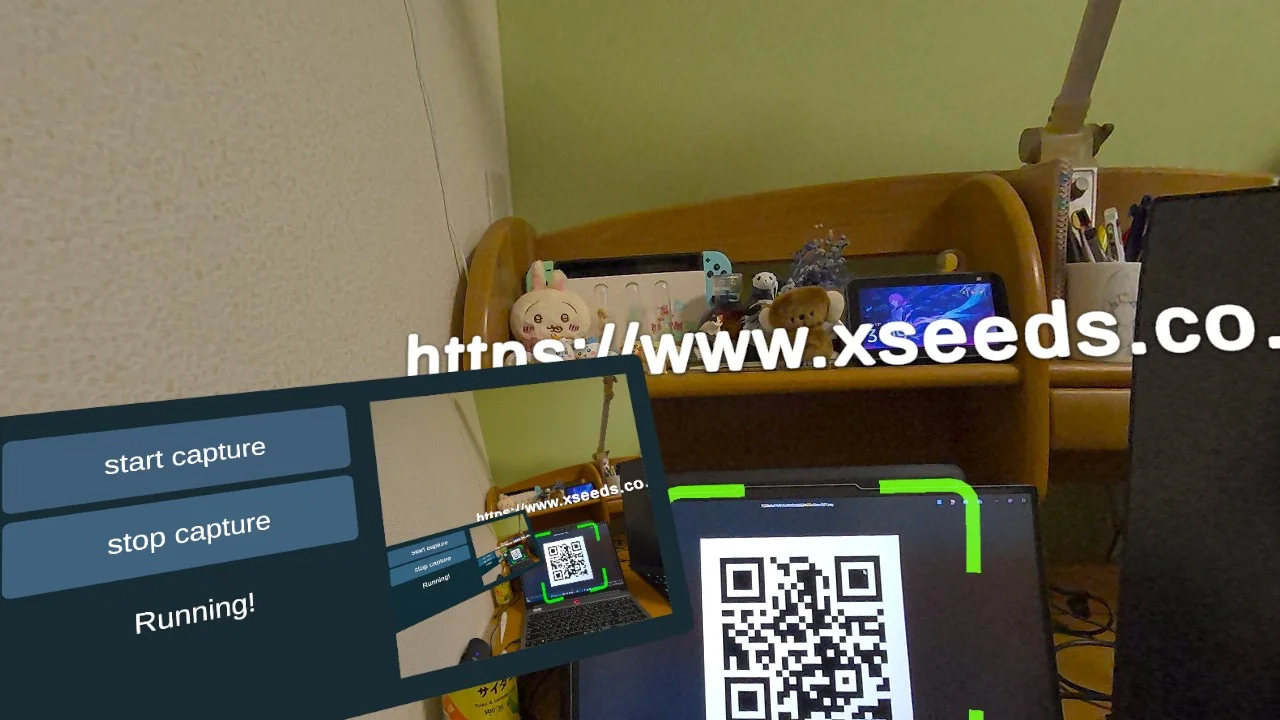
MENUに画面キャプチャの様子が出ているのでその要領で
スクリーンショット:
DisplayCaptureManagerが持っているTexture2D screenTextureをそのまま使用する。
csharp
using System;
using System.IO;
using UnityEngine;
using UnityEngine.UI;
using Anaglyph.DisplayCapture;

public class ScreenshotToSrc : MonoBehaviour
{
    [SerializeField] private DisplayCaptureManager captureManager;
    [SerializeField] private RawImage src1;

    private void Update()
    {
        // OVRInput.GetDown(OVRInput.RawButton.A) でトリガー
        if (OVRInput.GetDown(OVRInput.RawButton.A))
        {
            SaveAndDisplayScreenshot();
        }
    }

    private void SaveAndDisplayScreenshot()
    {
        // 1. DisplayCaptureManager から最新フレームのTexture2Dを取得
        var tex = captureManager.ScreenCaptureTexture;
        if (tex == null)
        {
            Debug.LogWarning("[ScreenshotToSrc] No screen texture is available yet!");
            return;
        }

        // 2. Texture2D を PNG にエンコード
        byte[] pngData = tex.EncodeToPNG();

        // 3. Assets/SRC ではなく、Application.persistentDataPath/SRC に保存
        //    (Questなどの実機でも書き込み可能なパス)
        string directoryPath = Path.Combine(Application.persistentDataPath, "SRC");
        if (!Directory.Exists(directoryPath))
        {
            Directory.CreateDirectory(directoryPath);
        }

        // ファイル名 (時刻入り)
        string fileName = $"Capture_{DateTime.Now:yyyyMMdd_HHmmss}.png";
        string fullPath = Path.Combine(directoryPath, fileName);

        File.WriteAllBytes(fullPath, pngData);
        Debug.Log($"[ScreenshotToSrc] Screenshot saved to: {fullPath}");

        // 4. 撮りたての画像を RawImage (src1) に反映させる
        //    ここでは元テクスチャをコピーしてセットする例を示します
        Texture2D lastScreenshot = new Texture2D(tex.width, tex.height);
        // 互換性のため、引数無しコンストラクタにしています
        lastScreenshot.SetPixels(tex.GetPixels());
        lastScreenshot.Apply();

        src1.texture = lastScreenshot;
        Debug.Log("[ScreenshotToSrc] Updated RawImage with the latest screenshot.");
    }
}
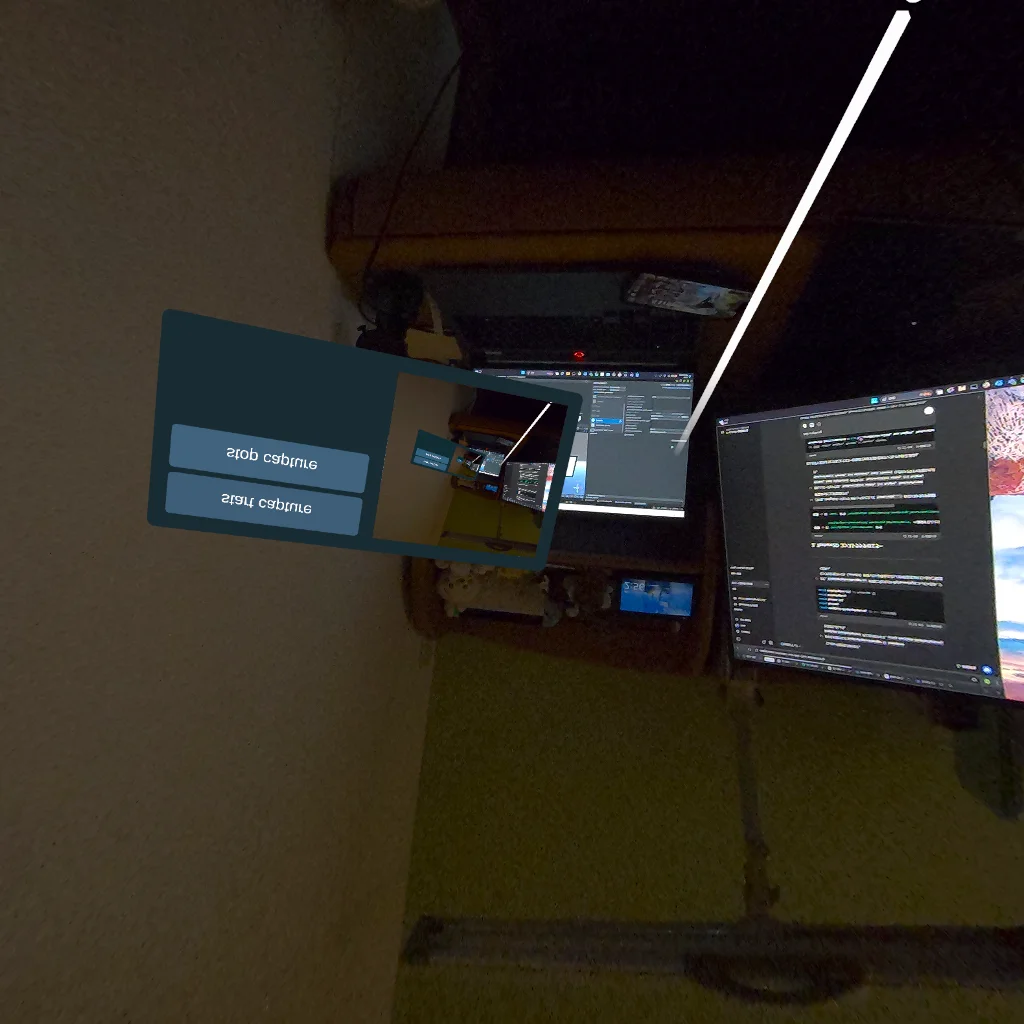
上記のコードで実装を行うと上下反対のスクショが出てきたので調整
csharp
using System;
using System.IO;
using UnityEngine;
using UnityEngine.UI;
using Anaglyph.DisplayCapture;

public class ScreenshotToSrc: MonoBehaviour
{
    [SerializeField] private DisplayCaptureManager captureManager;
    [SerializeField] private RawImage src1;

    private void Update()
    {
        // Aボタンを押したらスクリーンショットを保存 & 表示
        if (OVRInput.GetDown(OVRInput.RawButton.A))
        {
            SaveAndDisplayScreenshot();
        }
    }

    private void SaveAndDisplayScreenshot()
    {
        // 1. DisplayCaptureManager が持つ最新フレームの Texture2D を取得
        Texture2D originalTex = captureManager.ScreenCaptureTexture;
        if (originalTex == null)
        {
            Debug.LogWarning("[ScreenshotToSrc] ScreenCaptureTexture is null.");
            return;
        }

        // 2. 上下反転用の新しい Texture2D を作成
        Texture2D flippedTexture = new Texture2D(originalTex.width, originalTex.height, TextureFormat.RGBA32, false);

        // 3. ピクセルを取得・上下反転
        Color[] originalPixels = originalTex.GetPixels();
        Color[] flippedPixels = new Color[originalPixels.Length];
        int width = originalTex.width;
        int height = originalTex.height;

        for (int y = 0; y < height; y++)
        {
            int flippedY = (height - 1) - y;
            for (int x = 0; x < width; x++)
            {
                flippedPixels[flippedY * width + x] = originalPixels[y * width + x];
            }
        }

        // 4. flippedPixels を flippedTexture にセット
        flippedTexture.SetPixels(flippedPixels);
        flippedTexture.Apply();

        // 5. PNGとして保存 (Application.persistentDataPath/SRC)
        byte[] pngData = flippedTexture.EncodeToPNG();
        string dirPath = Path.Combine(Application.persistentDataPath, "Screenshots");
        if (!Directory.Exists(dirPath)) Directory.CreateDirectory(dirPath);

        string fileName = $"Capture_{DateTime.Now:yyyyMMdd_HHmmss}.png";
        string fullPath = Path.Combine(dirPath, fileName);

        File.WriteAllBytes(fullPath, pngData);
        Debug.Log($"[ScreenshotToSrc] Screenshot saved to: {fullPath}");

        // 6. 反転後のテクスチャを RawImage に表示
        src1.texture = flippedTexture;
    }
}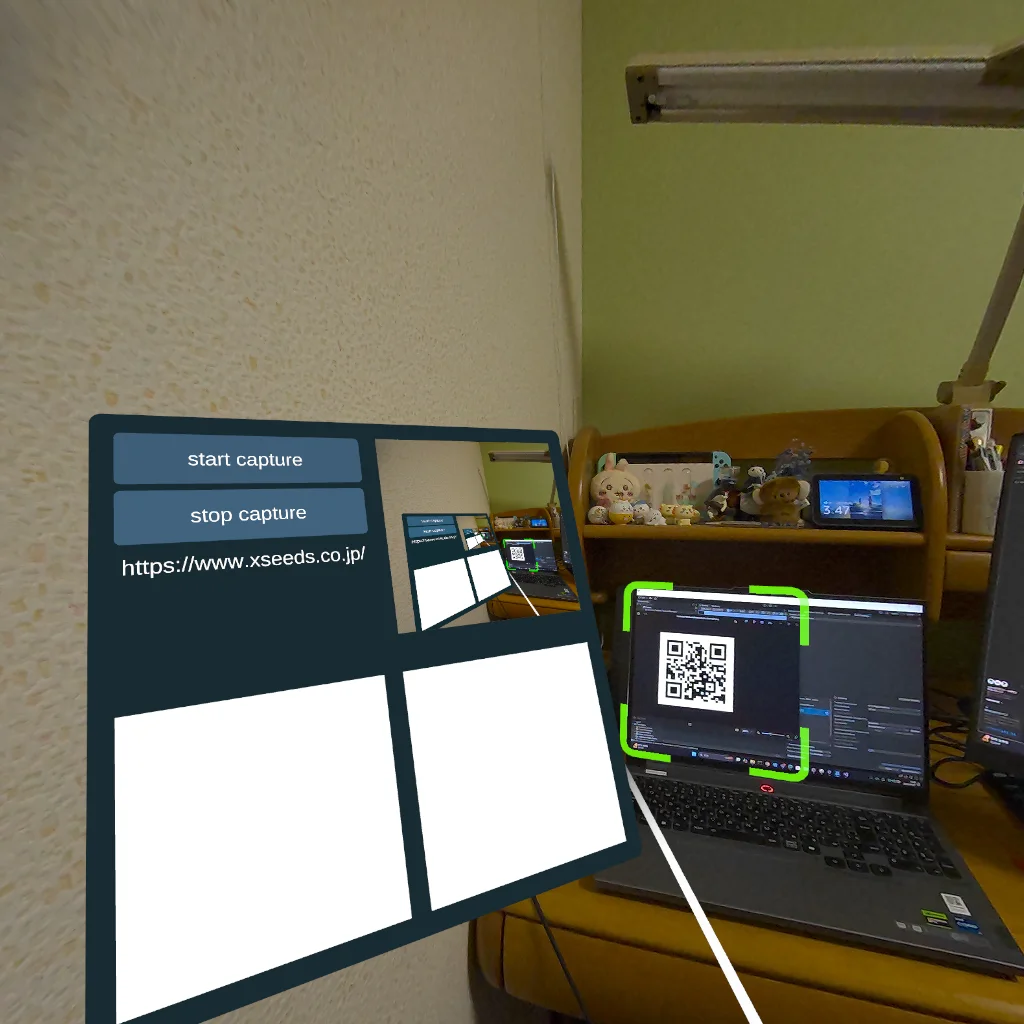
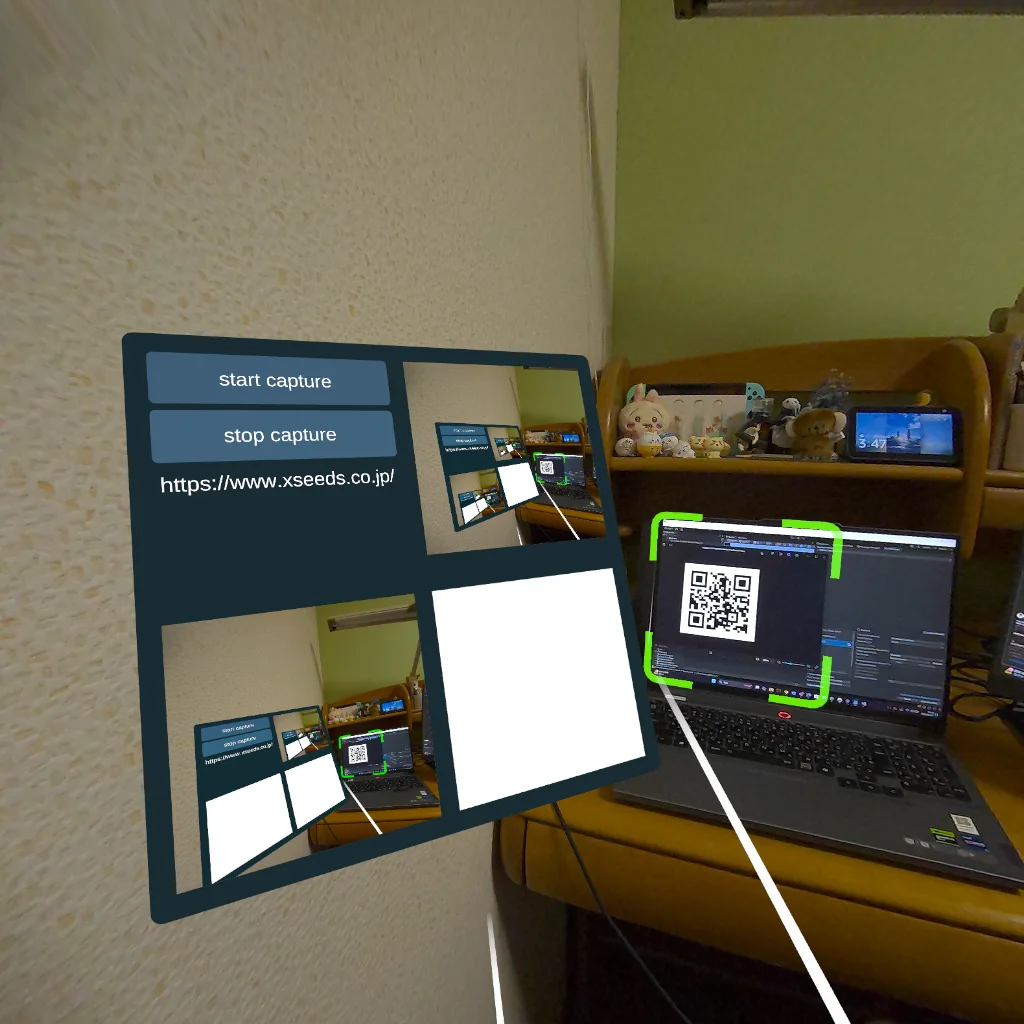
左下に直近の1枚をプレビューとして表示。
スクショはApplication.persistentDataPathに保存しており、パソコンにつないだ状態では、
PC\Quest 3\内部共有ストレージ\Android\data\ph.anagly.mediaprojectiondemo\files\Screenshots
から容易にアクセス可能
録画:
録画機能を付けるには、Javaなどからいじる必要あり
Javaは授業で見たくらいで実用的な知識がないためChatGPT任せになりそう
DisplayCaptureManager.java
csharp
package com.trev3d.DisplayCapture;

import static android.content.ContentValues.TAG;

import android.app.Activity;
import android.content.Context;
import android.content.Intent;
import android.graphics.PixelFormat;
import android.hardware.display.DisplayManager;
import android.hardware.display.VirtualDisplay;
import android.media.Image;
import android.media.ImageReader;
import android.media.MediaRecorder;
import android.media.projection.MediaProjection;
import android.media.projection.MediaProjectionManager;
import android.os.Handler;
import android.os.Looper;
import android.util.Log;
import android.view.Surface;

import androidx.annotation.NonNull;

import com.unity3d.player.UnityPlayer;

import java.io.IOException;
import java.nio.ByteBuffer;
import java.util.ArrayList;

public class DisplayCaptureManager implements ImageReader.OnImageAvailableListener {
    public static DisplayCaptureManager instance = null;
    public ArrayList<IDisplayCaptureReceiver> receivers;
    private ImageReader reader;
    private MediaProjection projection;
    private VirtualDisplay virtualDisplay;

    private Intent notifServiceIntent;
    private ByteBuffer byteBuffer;
    private int width;
    private int height;

    private UnityInterface unityInterface;
    private MediaRecorder mediaRecorder;
    private VirtualDisplay recordingVirtualDisplay;
    private boolean isRecording = false;

    private static class UnityInterface {
        private final String gameObjectName;

        private UnityInterface(String gameObjectName) {
            this.gameObjectName = gameObjectName;
        }

        private void Call(String functionName) {
            UnityPlayer.UnitySendMessage(gameObjectName, functionName, "");
        }

        public void OnCaptureStarted() {
            Call("OnCaptureStarted");
        }

        public void OnPermissionDenied() {
            Call("OnPermissionDenied");
        }

        public void OnCaptureStopped() {
            Call("OnCaptureStopped");
        }

        public void OnNewFrameAvailable() {
            Call("OnNewFrameAvailable");
        }

        public void OnRecordingStarted() {
            Call("OnRecordingStarted");
        }
        public void OnRecordingStopped() {
            Call("OnRecordingStopped");
        }
    }

    public DisplayCaptureManager() {
        receivers = new ArrayList<IDisplayCaptureReceiver>();
    }

    public static synchronized DisplayCaptureManager getInstance() {
        if (instance == null)
            instance = new DisplayCaptureManager();
        return instance;
    }

    @Override
    public void onImageAvailable(@NonNull ImageReader imageReader) {
        Image image = imageReader.acquireLatestImage();
        if (image == null) return;

        ByteBuffer buffer = image.getPlanes()[0].getBuffer();
        buffer.rewind();
        byteBuffer.clear();
        byteBuffer.put(buffer);

        long timestamp = image.getTimestamp();
        image.close();

        for(int i = 0; i < receivers.size(); i++) {
            buffer.rewind();
            receivers.get(i).onNewImage(byteBuffer, width, height, timestamp);
        }
        unityInterface.OnNewFrameAvailable();
    }

    private void handleScreenCaptureEnd() {
        virtualDisplay.release();
        UnityPlayer.currentContext.stopService(notifServiceIntent);
        unityInterface.OnCaptureStopped();
    }

    public void setup(String gameObjectName, int width, int height) {
        unityInterface = new UnityInterface(gameObjectName);
        this.width = width;
        this.height = height;

        int bufferSize = width * height * 4;
        byteBuffer = ByteBuffer.allocateDirect(bufferSize);

        reader = ImageReader.newInstance(width, height, PixelFormat.RGBA_8888, 2);
        reader.setOnImageAvailableListener(this, new Handler(Looper.getMainLooper()));
    }

    public void requestCapture() {
        Log.i(TAG, "Asking for screen capture permission...");
        Intent intent = new Intent(
                UnityPlayer.currentActivity,
                DisplayCaptureRequestActivity.class);
        UnityPlayer.currentActivity.startActivity(intent);
    }

    public void onPermissionResponse(int resultCode, Intent intent) {
        if (resultCode != Activity.RESULT_OK) {
            unityInterface.OnPermissionDenied();
            Log.i(TAG, "Screen capture permission denied!");
            return;
        }
        notifServiceIntent = new Intent(
                UnityPlayer.currentContext,
                DisplayCaptureNotificationService.class);
        UnityPlayer.currentContext.startService(notifServiceIntent);

        new Handler(Looper.getMainLooper()).postDelayed(() -> {
            Log.i(TAG, "Starting screen capture...");

            MediaProjectionManager projectionManager = (MediaProjectionManager)
                    UnityPlayer.currentContext.getSystemService(Context.MEDIA_PROJECTION_SERVICE);
            projection = projectionManager.getMediaProjection(resultCode, intent);

            projection.registerCallback(new MediaProjection.Callback() {
                @Override
                public void onStop() {
                    Log.i(TAG, "Screen capture ended!");
                    handleScreenCaptureEnd();
                }
            }, new Handler(Looper.getMainLooper()));

            virtualDisplay = projection.createVirtualDisplay(
                    "ScreenCapture",
                    width, height,
                    300,
                    DisplayManager.VIRTUAL_DISPLAY_FLAG_AUTO_MIRROR,
                    reader.getSurface(),
                    null, null
            );

            unityInterface.OnCaptureStarted();
        }, 100);

        Log.i(TAG, "Screen capture started!");
    }

    public void stopCapture() {
        Log.i(TAG, "Stopping screen capture...");
        if(projection == null) return;
        projection.stop();
    }

    public ByteBuffer getByteBuffer() {
        return byteBuffer;
    }

    public void startRecording(String outputPath) {
        if (isRecording) {
            Log.w(TAG, "Already recording!");
            return;
        }
        if (projection == null) {
            Log.e(TAG, "MediaProjection not active. requestCapture() first!");
            return;
        }
        try {
            mediaRecorder = new MediaRecorder();
            mediaRecorder.setVideoSource(MediaRecorder.VideoSource.SURFACE);
            mediaRecorder.setOutputFormat(MediaRecorder.OutputFormat.MPEG_4);
            mediaRecorder.setOutputFile(outputPath);
            mediaRecorder.setVideoEncoder(MediaRecorder.VideoEncoder.H264);
            mediaRecorder.setVideoSize(1280, 720);
            mediaRecorder.setVideoFrameRate(30);
            mediaRecorder.setVideoEncodingBitRate(1500000);

            mediaRecorder.prepare();

            Surface recorderSurface = mediaRecorder.getSurface();

            recordingVirtualDisplay = projection.createVirtualDisplay(
                    "RecordingDisplay",
                    1280,
                    720,
                    300,
                    DisplayManager.VIRTUAL_DISPLAY_FLAG_AUTO_MIRROR,
                    recorderSurface,
                    null,
                    null
            );

            mediaRecorder.start();
            isRecording = true;

            Log.i(TAG, "startRecording() -> " + outputPath);
            unityInterface.OnRecordingStarted();

        } catch (IOException e) {
            Log.e(TAG, "startRecording failed: " + e.getMessage());
            e.printStackTrace();
        }
    }

    public void stopRecording() {
        if (!isRecording) {
            Log.i(TAG, "Not recording.");
            return;
        }
        isRecording = false;

        try {
            mediaRecorder.stop();
        } catch (Exception e) {
            e.printStackTrace();
        }
        mediaRecorder.reset();
        mediaRecorder.release();
        mediaRecorder = null;

        if (recordingVirtualDisplay != null) {
            recordingVirtualDisplay.release();
            recordingVirtualDisplay = null;
        }

        Log.i(TAG, "stopRecording()");
        unityInterface.OnRecordingStopped();
    }
}
CaptureVideoRecorder.cs
csharp
using UnityEngine;
using System;
using System.IO;
using UnityEngine.UI;
using UnityEngine.Video;

// DisplayCaptureManager がいるパッケージ:
// もし名前空間が "com.trev3d.DisplayCapture" ではなく「Anaglyph.DisplayCapture」などなら修正してください

public class CaptureVideoRecorder : MonoBehaviour
{
    private AndroidJavaClass androidClass;
    private AndroidJavaObject androidInstance;

    [SerializeField] private bool isRecording = false;

    [Header("Preview (Optional)")]
    [SerializeField] private RawImage preview;
    [SerializeField] private VideoPlayer videoPlayer;

    private string lastRecordedFilePath;

    private void Awake()
    {
        // Java側クラス "com.trev3d.DisplayCapture.DisplayCaptureManager"
        androidClass = new AndroidJavaClass("com.trev3d.DisplayCapture.DisplayCaptureManager");
        androidInstance = androidClass.CallStatic<AndroidJavaObject>("getInstance");
    }

    private void Update()
    {
        // Bボタンで録画開始/停止をトグルする
        if (OVRInput.GetDown(OVRInput.RawButton.B))
        {
            if (!isRecording)
            {
                StartRecording();
            }
            else
            {
                StopRecording();
            }
        }
    }

    private void StartRecording()
    {
        isRecording = true;
        // 出力先 (Questなどでも書き込み可能なディレクトリ)
        string dirPath = Path.Combine(Application.persistentDataPath, "Videos");
        if (!Directory.Exists(dirPath)) Directory.CreateDirectory(dirPath);

        lastRecordedFilePath = Path.Combine(dirPath, $"Record_{DateTime.Now:yyyyMMdd_HHmmss}.mp4");

        // Java: startRecording(String outputPath)
        androidInstance.Call("startRecording", lastRecordedFilePath);
        Debug.Log("[MediaRecorderController] Start Recording -> " + lastRecordedFilePath);
    }

    private void StopRecording()
    {
        isRecording = false;

        // Java: stopRecording()
        androidInstance.Call("stopRecording");
        Debug.Log("[MediaRecorderController] Stop Recording -> " + lastRecordedFilePath);

        // ここで録画完了後の動画を再生してみる
        PlayLastRecordedVideo();
    }

    private void PlayLastRecordedVideo()
    {
        videoPlayer.source = VideoSource.Url;
        videoPlayer.url = lastRecordedFilePath;
        videoPlayer.renderMode = VideoRenderMode.APIOnly;
        videoPlayer.prepareCompleted += OnVideoPrepared;
        videoPlayer.Prepare();
    }

    private void OnVideoPrepared(VideoPlayer source)
    {
        if (preview != null)
            preview.texture = source.texture;
        source.Play();
        Debug.Log("[MediaRecorderController] Video playback started.");
    }
}
下の動画は作成した録画機能を使用して撮影したもの。録画を始めるとQRコード読み取りの機能が止まってしまう。
1.スクリーンショットのように2Dテクスチャが更新されるたびにデータを取得しそれらを動画にする方法
外部の機能を入れる必要があり。FFmpegというものがあるが、Androidベースの者には対応していないようで動作せず。
スクリーンショットをフォルダに入れておいてPCに接続の上FFmpegを動かすという形であれば動画化できる可能性あり。
2.VirtualDisplay2つ用意する方法
csharp
using UnityEngine;
using System;
using System.IO;
using UnityEngine.UI;
using UnityEngine.Video;

namespace Anaglyph.DisplayCapture
{
    public class MediaRecorderController : MonoBehaviour
    {
        private bool isRecording = false;
        private string lastRecordedFilePath;

        [Header("Preview UI (Optional)")]
        [SerializeField] private RawImage preview;
        [SerializeField] private VideoPlayer videoPlayer;

        private void Update()
        {
            // Bボタン押下で録画開始/停止
            if (OVRInput.GetDown(OVRInput.RawButton.B))
            {
                if (!isRecording)
                {
                    StartRecord();
                }
                else
                {
                    StopRecord();
                }
            }
        }

        private void StartRecord()
        {
            isRecording = true;

            string dir = Path.Combine(Application.persistentDataPath, "Videos");
            if (!Directory.Exists(dir)) Directory.CreateDirectory(dir);

            // 現在時刻でファイル名
            lastRecordedFilePath = Path.Combine(dir, $"Record_{DateTime.Now:yyyyMMdd_HHmmss}.mp4");

            // DisplayCaptureManager の StartRecording
            DisplayCaptureManager.Instance.StartRecording(lastRecordedFilePath);

            Debug.Log("[MediaRecorderController] Start Recording -> " + lastRecordedFilePath);
        }

        private void StopRecord()
        {
            isRecording = false;

            DisplayCaptureManager.Instance.StopRecording();
            Debug.Log("[MediaRecorderController] Stop Recording -> " + lastRecordedFilePath);

            // オプション: すぐ再生
            PlayLastRecordedVideo();
        }

        private void PlayLastRecordedVideo()
        {
            if (!videoPlayer || !preview) return;

            videoPlayer.source = VideoSource.Url;
            videoPlayer.url = lastRecordedFilePath;
            videoPlayer.renderMode = VideoRenderMode.APIOnly;

            videoPlayer.prepareCompleted += OnPrepared;
            videoPlayer.Prepare();
        }

        private void OnPrepared(VideoPlayer source)
        {
            preview.texture = source.texture;
            source.Play();
        }
    }
}
csharp
package com.trev3d.DisplayCapture;

import static android.content.ContentValues.TAG;

import android.app.Activity;
import android.content.Context;
import android.content.Intent;
import android.graphics.PixelFormat;
import android.hardware.display.DisplayManager;
import android.hardware.display.VirtualDisplay;
import android.media.Image;
import android.media.ImageReader;
import android.media.MediaRecorder;
import android.media.projection.MediaProjection;
import android.media.projection.MediaProjectionManager;
import android.os.Handler;
import android.os.Looper;
import android.util.Log;
import android.view.Surface;

import androidx.annotation.NonNull;

import com.unity3d.player.UnityPlayer;

import java.io.IOException;
import java.nio.ByteBuffer;
import java.util.ArrayList;

public class DisplayCaptureManager implements ImageReader.OnImageAvailableListener {
    public static DisplayCaptureManager instance = null;

    public ArrayList<IDisplayCaptureReceiver> receivers;

    private ImageReader reader;
    private VirtualDisplay virtualDisplay;

    private MediaRecorder mediaRecorder;
    private VirtualDisplay recordingVirtualDisplay;
    private boolean isRecording = false;

    private MediaProjection projection;
    private Intent notifServiceIntent;
    private ByteBuffer byteBuffer;
    private int width;
    private int height;

    private UnityInterface unityInterface;

    private static class UnityInterface {
        private final String gameObjectName;
        private UnityInterface(String gameObjectName) {
            this.gameObjectName = gameObjectName;
        }
        private void Call(String functionName) {
            UnityPlayer.UnitySendMessage(gameObjectName, functionName, "");
        }
        public void OnCaptureStarted()  { Call("OnCaptureStarted"); }
        public void OnPermissionDenied() { Call("OnPermissionDenied"); }
        public void OnCaptureStopped()  { Call("OnCaptureStopped"); }
        public void OnNewFrameAvailable() { Call("OnNewFrameAvailable"); }
        public void OnRecordingStarted()  { Call("OnRecordingStarted"); }
        public void OnRecordingStopped()  { Call("OnRecordingStopped"); }
    }

    public DisplayCaptureManager() {
        receivers = new ArrayList<>();
    }

    public static synchronized DisplayCaptureManager getInstance() {
        if (instance == null) {
            instance = new DisplayCaptureManager();
        }
        return instance;
    }

    public void onPermissionResponse(int resultCode, Intent intent) {
        if (resultCode != Activity.RESULT_OK) {
            unityInterface.OnPermissionDenied();
            Log.i(TAG, "Screen capture permission denied!");
            return;
        }
        notifServiceIntent = new Intent(UnityPlayer.currentContext, DisplayCaptureNotificationService.class);
        UnityPlayer.currentContext.startService(notifServiceIntent);

        new Handler(Looper.getMainLooper()).postDelayed(() -> {
            Log.i(TAG, "Starting screen capture...");

            MediaProjectionManager projectionManager =
                    (MediaProjectionManager) UnityPlayer.currentContext.getSystemService(Context.MEDIA_PROJECTION_SERVICE);
            projection = projectionManager.getMediaProjection(resultCode, intent);

            projection.registerCallback(new MediaProjection.Callback() {
                @Override
                public void onStop() {
                    Log.i(TAG, "Screen capture ended!");
                    handleScreenCaptureEnd();
                }
            }, new Handler(Looper.getMainLooper()));

            virtualDisplay = projection.createVirtualDisplay(
                    "ScreenCapture",
                    width, height,
                    300,
                    DisplayManager.VIRTUAL_DISPLAY_FLAG_AUTO_MIRROR,
                    reader.getSurface(),
                    null, null
            );

            unityInterface.OnCaptureStarted();
            Log.i(TAG, "Screen capture started!");
        }, 100);
    }

    @Override
    public void onImageAvailable(@NonNull ImageReader imageReader) {
        Image image = imageReader.acquireLatestImage();
        if (image == null) return;

        ByteBuffer buffer = image.getPlanes()[0].getBuffer();
        buffer.rewind();
        byteBuffer.clear();
        byteBuffer.put(buffer);

        long timestamp = image.getTimestamp();
        image.close();

        for (IDisplayCaptureReceiver r : receivers) {
            buffer.rewind();
            r.onNewImage(byteBuffer, width, height, timestamp);
        }
        unityInterface.OnNewFrameAvailable();
    }

    private void handleScreenCaptureEnd() {
        if (virtualDisplay != null) {
            virtualDisplay.release();
            virtualDisplay = null;
        }
        if (notifServiceIntent != null) {
            UnityPlayer.currentContext.stopService(notifServiceIntent);
            notifServiceIntent = null;
        }
        projection = null;
        unityInterface.OnCaptureStopped();
    }

    public void setup(String gameObjectName, int width, int height) {
        unityInterface = new UnityInterface(gameObjectName);

        this.width = 600;
        this.height = 600;

        int bufferSize = this.width * this.height * 4;
        byteBuffer = ByteBuffer.allocateDirect(bufferSize);

        reader = ImageReader.newInstance(this.width, this.height, PixelFormat.RGBA_8888, 2);
        reader.setOnImageAvailableListener(this, new Handler(Looper.getMainLooper()));
    }

    public void requestCapture() {
        Log.i(TAG, "Asking for screen capture permission...");
        Intent intent = new Intent(UnityPlayer.currentActivity, DisplayCaptureRequestActivity.class);
        UnityPlayer.currentActivity.startActivity(intent);
    }

    public void stopCapture() {
        Log.i(TAG, "Stopping screen capture...");
        if (projection != null) {
            projection.stop();
        }
    }

    public ByteBuffer getByteBuffer() {
        return byteBuffer;
    }

    public void startRecording(String outputPath) {
        if (isRecording) {
            Log.w(TAG, "Already recording!");
            return;
        }
        if (projection == null) {
            Log.e(TAG, "MediaProjection not active. requestCapture() first!");
            return;
        }
        try {
            mediaRecorder = new MediaRecorder();
            mediaRecorder.setVideoSource(MediaRecorder.VideoSource.SURFACE);
            mediaRecorder.setOutputFormat(MediaRecorder.OutputFormat.MPEG_4);
            mediaRecorder.setOutputFile(outputPath);

            mediaRecorder.setVideoEncoder(MediaRecorder.VideoEncoder.H264);
            mediaRecorder.setVideoSize(600, 600);

            mediaRecorder.setVideoFrameRate(15);
            mediaRecorder.setVideoEncodingBitRate(1000000);

            mediaRecorder.prepare();

            Surface recSurface = mediaRecorder.getSurface();

            recordingVirtualDisplay = projection.createVirtualDisplay(
                    "RecordingDisplay",
                    600, 600,
                    300,
                    DisplayManager.VIRTUAL_DISPLAY_FLAG_AUTO_MIRROR,
                    recSurface,
                    null, null
            );

            mediaRecorder.start();
            isRecording = true;
            Log.i(TAG, "startRecording -> " + outputPath);

            unityInterface.OnRecordingStarted();

        } catch (IOException e) {
            e.printStackTrace();
        }
    }

    public void stopRecording() {
        if (!isRecording) {
            Log.i(TAG, "Not recording now.");
            return;
        }
        isRecording = false;
        try {
            mediaRecorder.stop();
        } catch(Exception e) {
            e.printStackTrace();
        }
        mediaRecorder.reset();
        mediaRecorder.release();
        mediaRecorder = null;

        if (recordingVirtualDisplay != null) {
            recordingVirtualDisplay.release();
            recordingVirtualDisplay = null;
        }

        Log.i(TAG, "stopRecording()");
        unityInterface.OnRecordingStopped();
    }
}
作成しエラー除去までできたもののうまく動作せず。スクリーンショットの機能も動かなくなってしまったり、アプリが連続して落ちてしまうなど….
性能的な問題やVirtualDisplayを2つ作ることができない可能性あり。
Author: 水上 | Source:
水上\QDA:スクショ&録画&ミラーリング 8faf2081cdbc459eb094bd4bcbc4d97a.md