Appearance
MetaQuest デモ製作
metaquestで釣りゲームを作ってみる。
予定日程としては以下
1/29 設計 ステージ整備
1/31 移動・アイテムをつかむシステム作成
2/4 釣り竿システム作成
2/5 釣りシステム作成 デバッグ
2/6 デバッグ
参考にしたいサイト
inputsystemとmetaquest
Unityの新しいInput SystemでOculusを使用する
metaquestでオブジェクトをつかむ
MetaQuestでオブジェクトをつかむ(準備編) - tks_yoshinagaの日記
コントローラのふり幅をとる
Meta Quest3 コントローラーを振ったら玉が打つ - Qiita
持ち運ぶ
VR上のオブジェクトを「触る」「つかむ」「持ち運ぶ」仕組みを実装しよう | gihyo.jp
別記 この記事勉強になりそうなので読みたい
【Unity】Unityで学ぶデザインパターン14: Command パターン【デザパタ】 - Qiita
1/31
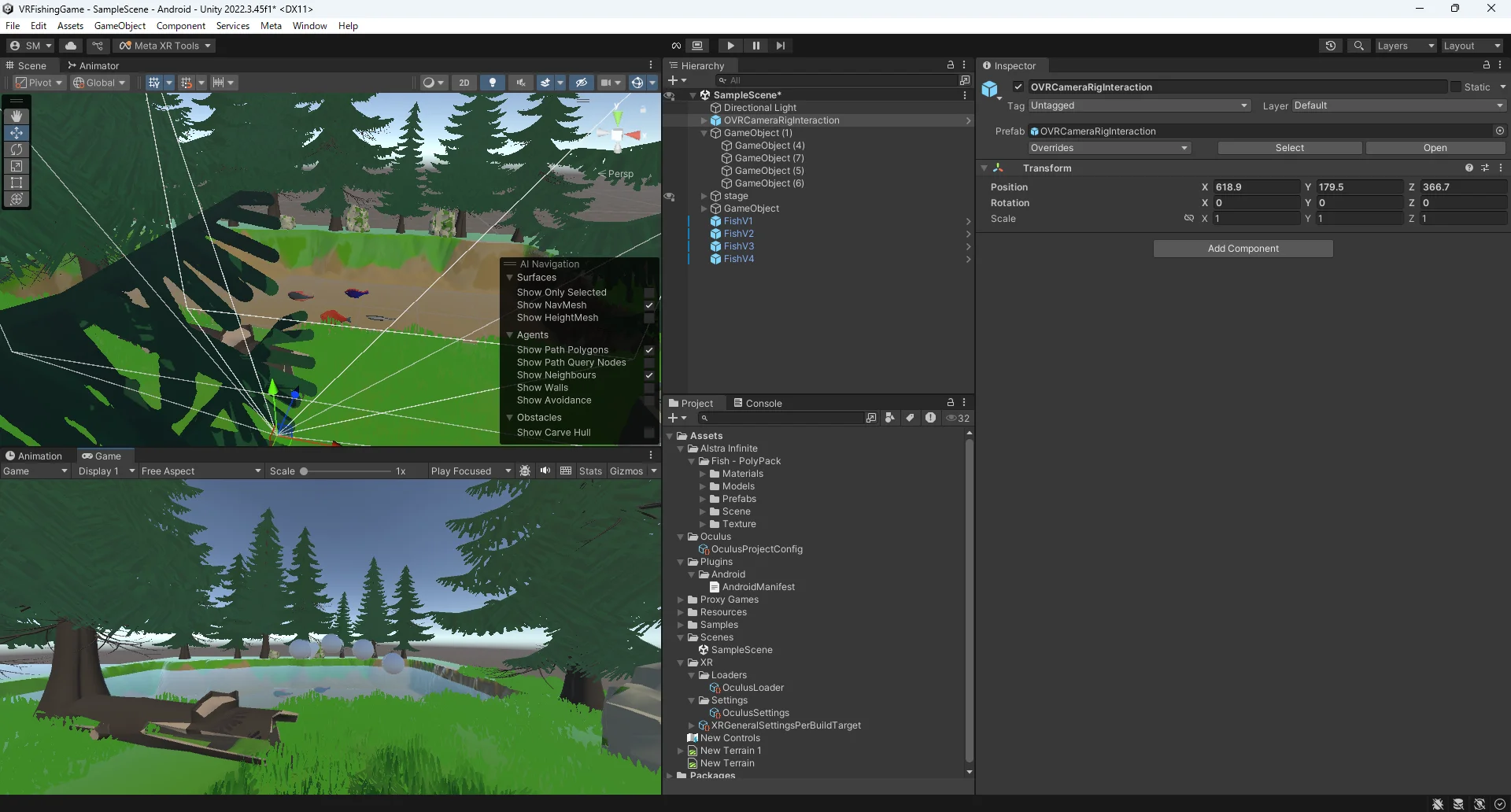
アセット置いただけのステージは完成してます。当たり判定も適当に着けました。
Meta XR SDK を用いたスムーズ移動とテレポートの実装
↑移動方法
テレポートは実装するつもりなかったので移動だけ書かれたとおりにプレハブを設置してみました
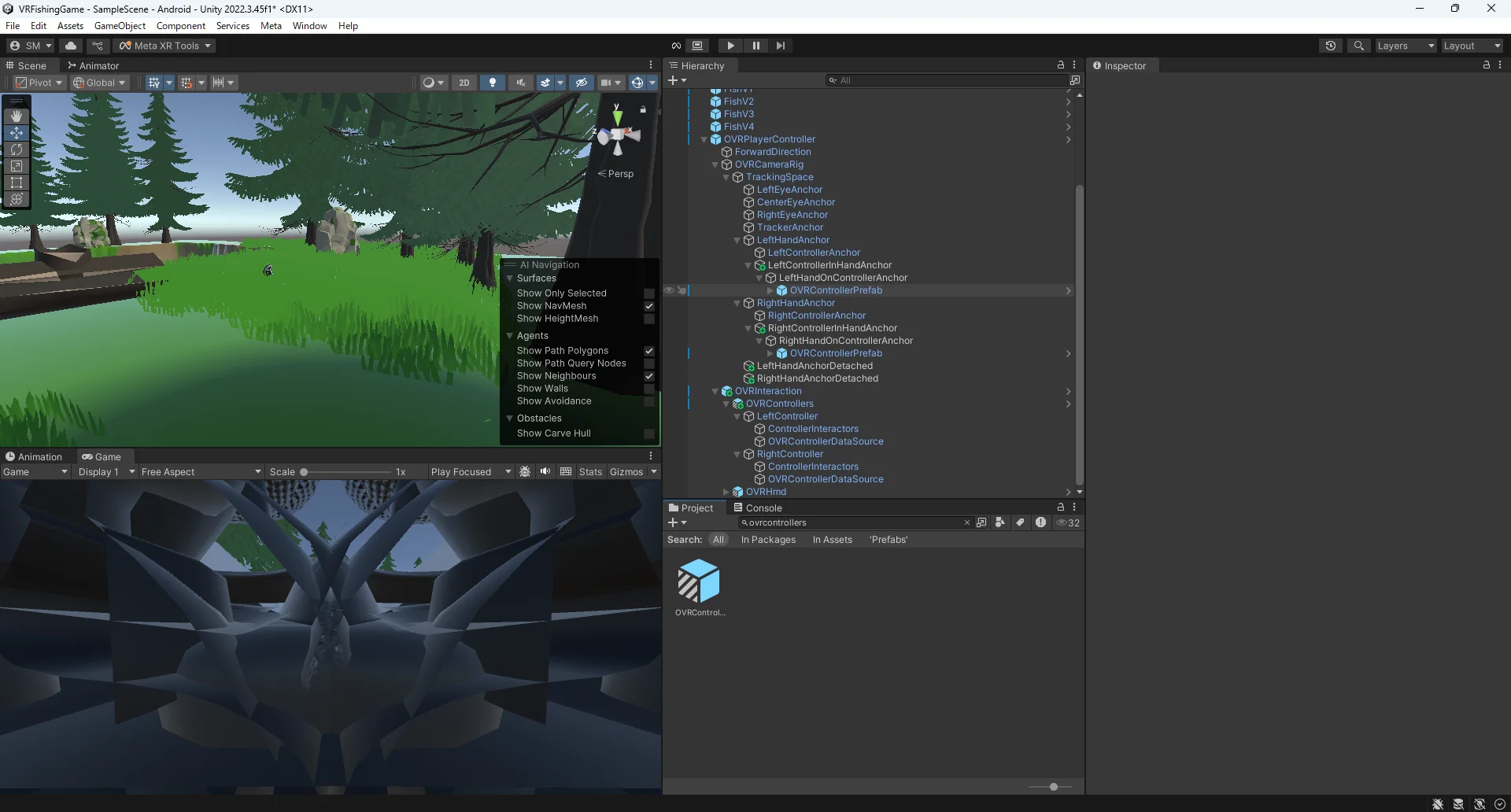
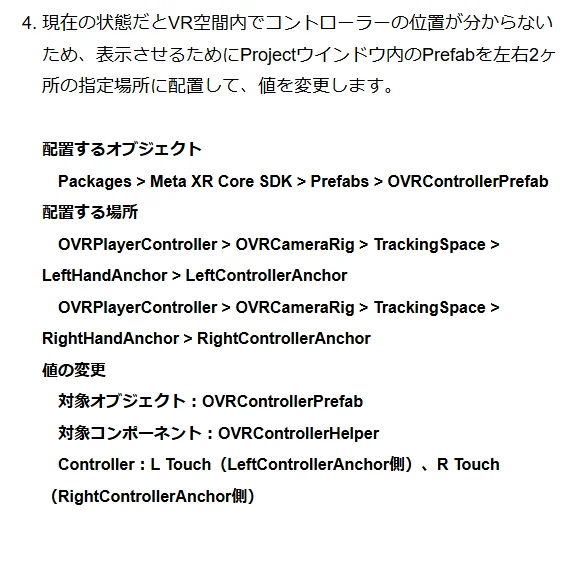
この部分で設置したコントローラのプレハブ、片方ずつになっていないし、カメラにかぶっているし大丈夫か本当に不安です。
エディタ上でのデバッグがやはりできません。。。
設定は下の通り。
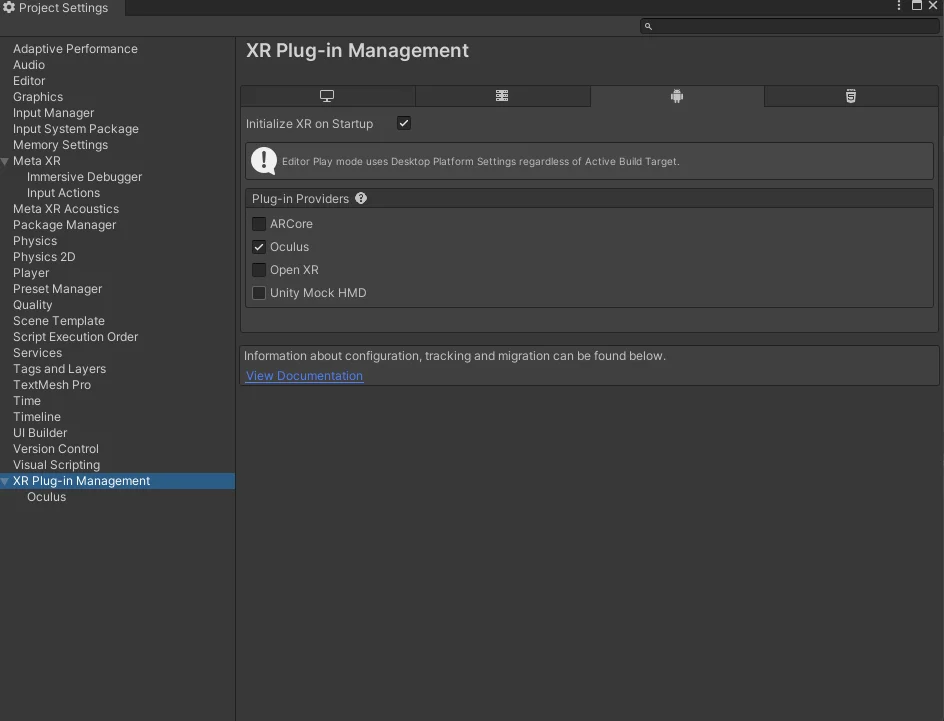
↓メタ公式の手順
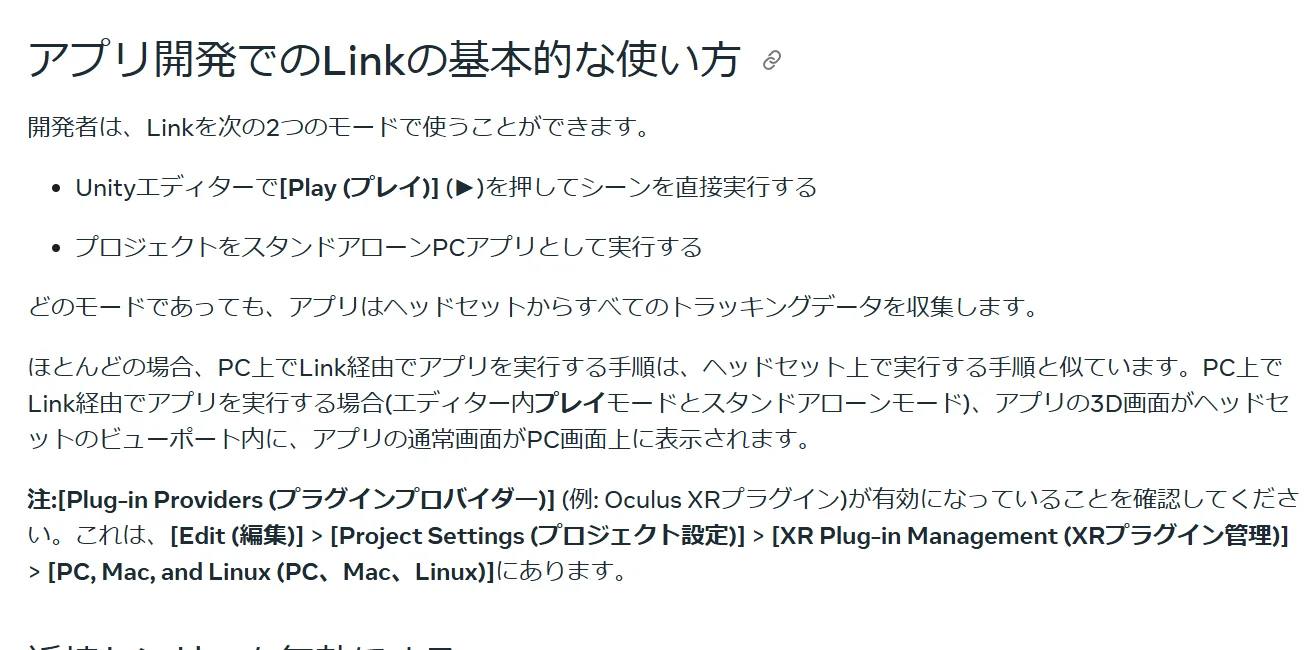
OculusにしたりOpenXRに切り替えたりしてみる。
↓
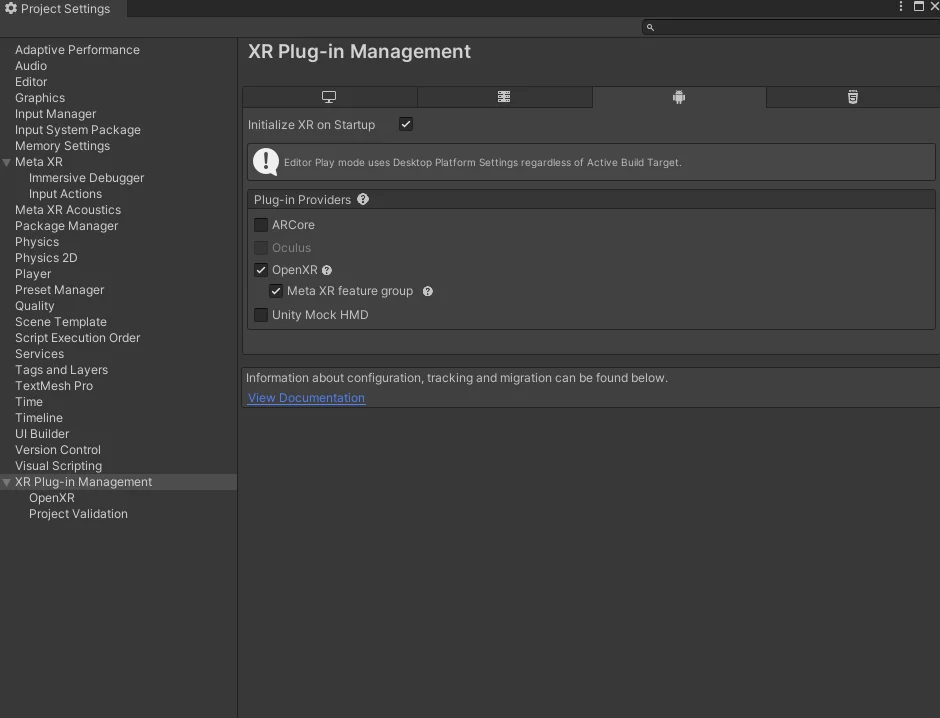
できない。
コントローラ操作などテストしてみたいけれどそれもできない。
ビルドも時間が異様にかかってできない(オブジェクトが多いから?)
Unable to start Oculus XR Plugin. Possible causes include a headset not being attached, or the Oculus runtime is not installed or up to date. If you've recently installed or updated the Oculus runtime, you may need to reboot or close Unity and the Unity Hub and try again. UnityEngine.Debug:LogWarning (object) Unity.XR.Oculus.OculusLoader:Initialize () (at ./Library/PackageCache/com.unity.xr.oculus@4.2.0/Runtime/OculusLoader.cs:189) UnityEngine.XR.Management.XRGeneralSettings:AttemptInitializeXRSDKOnLoad () (at ./Library/PackageCache/com.unity.xr.management@4.5.0/Runtime/XRGeneralSettings.cs:148)
パッケージからプレハブをもってきて、そこに変更を加えようとした際、以下のようなエラーが出ました。
ArgumentException: Can't save an immutable Prefab UnityEditor.PrefabUtility.SavePrefabAsset (UnityEngine.GameObject asset, System.Boolean& savedSuccessfully) (at <0ab653b677424c84aa7f1e3350b765bc>:0) UnityEditor.PrefabImporterEditor.SaveDirtyPrefabAssets (System.Boolean reloadInspectors) (at <0ab653b677424c84aa7f1e3350b765bc>:0) UnityEditor.PrefabImporterEditor.ObjectChangeEventPublished (UnityEditor.ObjectChangeEventStream& stream) (at <0ab653b677424c84aa7f1e3350b765bc>:0) UnityEditor.ObjectChangeEvents.InvokeChangeEvent (System.IntPtr events, System.Int32 eventsCount, System.IntPtr payLoad, System.Int32 payLoadLength) (at <0ab653b677424c84aa7f1e3350b765bc>:0)
パッケージフォルダにあるプレハブはreadOnlyになっているらしく、OVRPlayerControllerにControllerPrefabを加えたのが原因だったらしいです。
一度パッケージフォルダにある該当のプレハブをAssetsファイルにうつしてからシーンに配置するとこの警告文は出なくなりました。
↓置きなおしました。
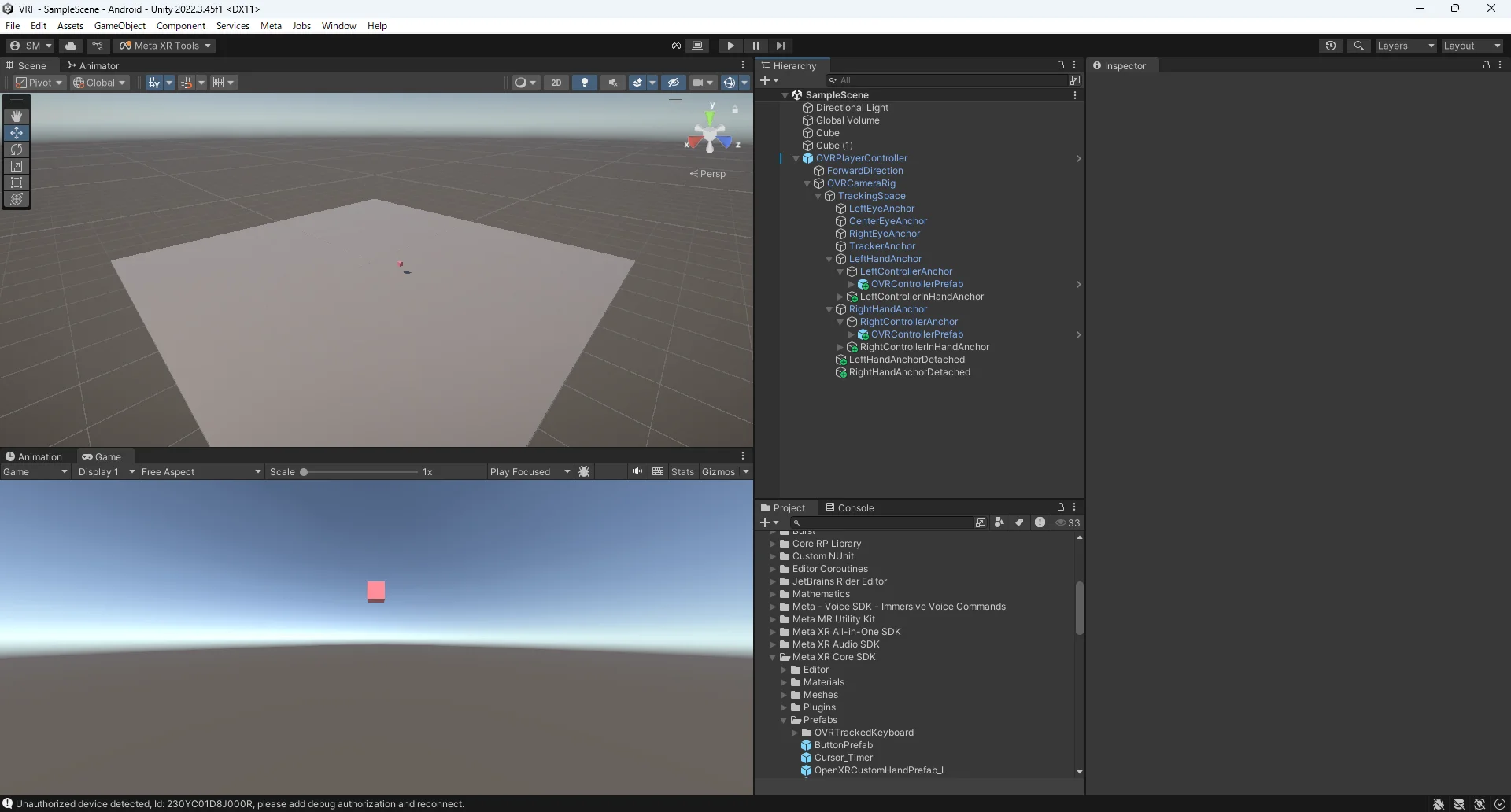
2/4
VRゴーグル上でのデバッグできました!!!
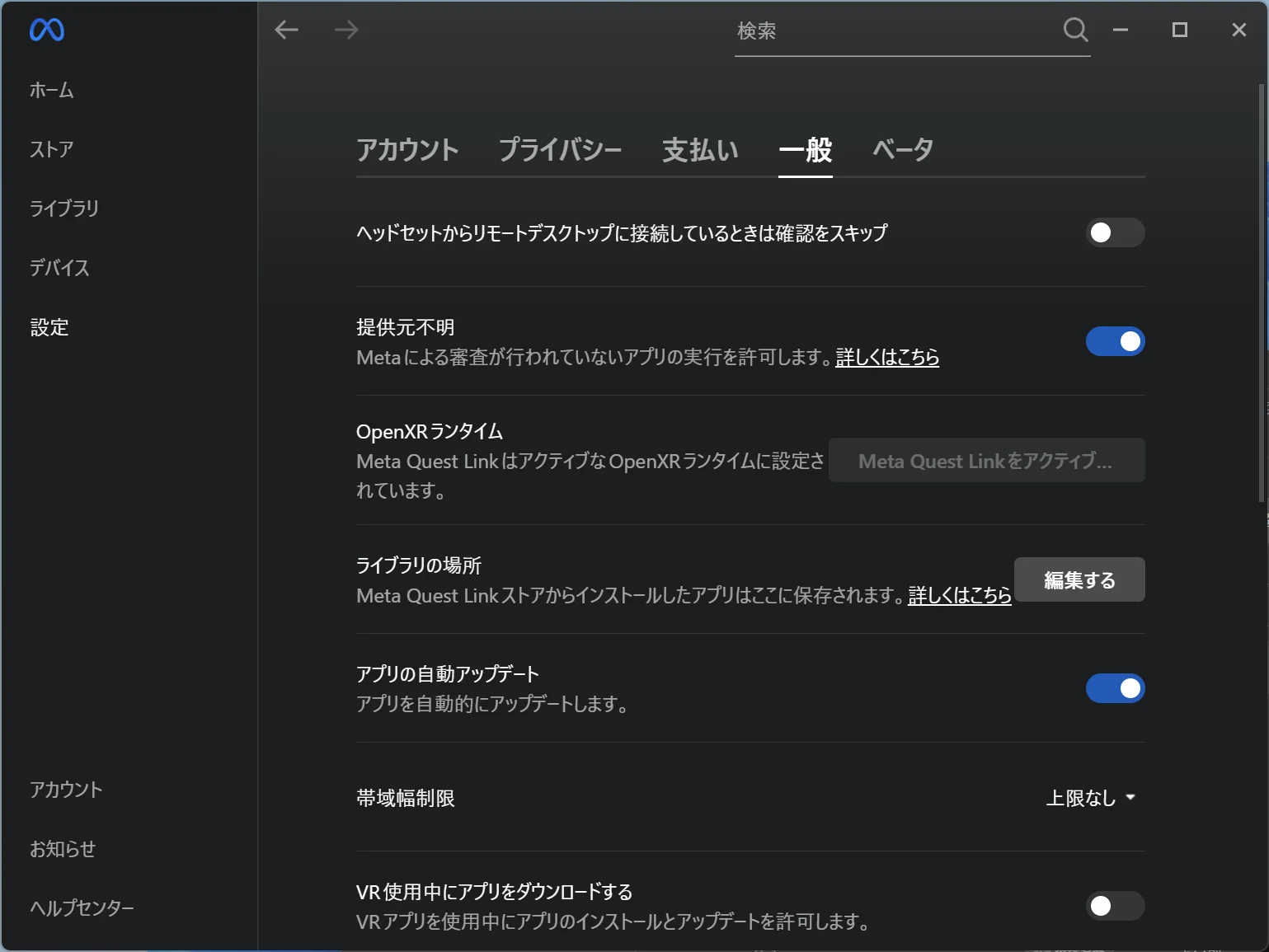
metaquestLink内のOpenXRランタイムというのと提供元不明をオンにしたらいけました。
仕切り直して、全部記事通りに配置してみたけどコントローラがそもそも表示されてない。
↓ヒエラルキーの様子
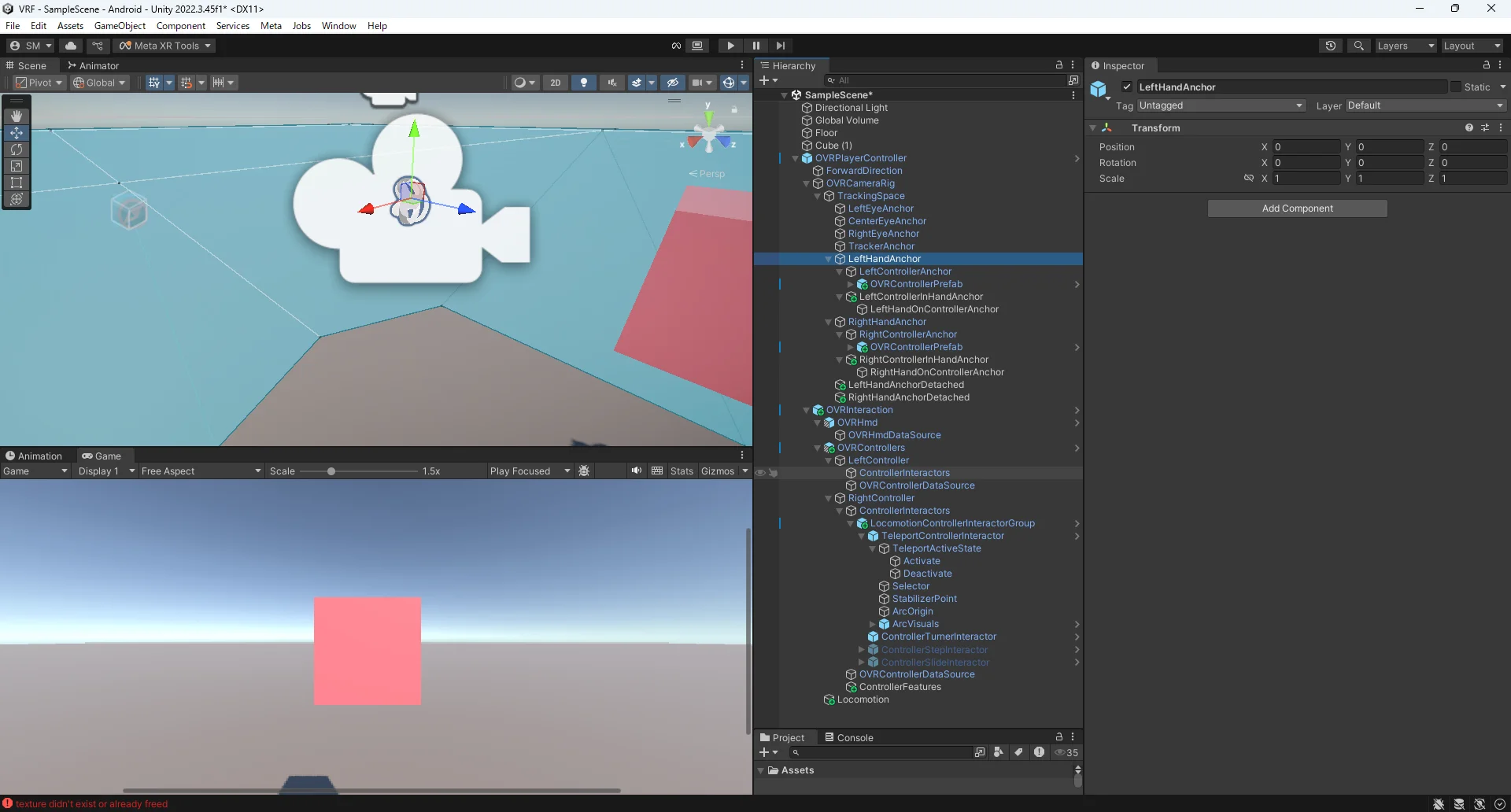
camerarigを直接動かしてやる方法に切り替えようと思います。
【Unity(C#)】VRカメラを任意のポジションに移動する方法 - Qiita
そもそもエディタ上のデバッグだとコントローラを認識していない気がしてきた。
環境構築で作ったプロジェクト(ビルドして動いたデータ)のエディタ上で動かしてみたけれどやはり手が認識されてない。
Unityhubからインストールできるデモプロジェクトはコントローラも上手くエディタ上で動きました。
今回はlinkの方法とかじゃなく私のプロジェクトの設定の何かがおかしいということっぽい。
OpenXRのOpenXRFeatureGroups の metaquestSupportにチェックを入れてみる→ダメ
もう一回プロジェクト作り直してみる。(ビルドして動いた)→ダメ
ビルドセッティングの見直し(実行環境をmetaquestproに指定)→ダメ
pluginをoculusに戻してみる→ダメ
ヘッドセットでのカメラ操作は効くので本当にコントローラのみ接続されていない。
ビルドすると手も出るし、コントローラでのplayer操作も効く。
2/5
エディタ上でのデバッグはあきらめてすべてビルドアンドランで動かしていくことにしました。
移動できるようにしたうえで物をつかめるようにする
上記実装できたので手順を書いていきます。
①OVRCameraRigInteractionをシーンに置く
②下記スクリプトを
OVRCameraRigInteraction>OVRCameraRigに着ける
csharp
using System.Collections;
using System.Collections.Generic;
using System.Security.Cryptography;
using UnityEngine;
using UnityEngine.XR;

public class Move : MonoBehaviour
{
    [SerializeField]
    private float moveSpeed = 2.0f;
    // Start is called before the first frame update
    void Start()
    {
    }

    // Update is called once per frame
    void Update()
    {
        PLMove();
    }

    private void PLMove()
    {
        // 右ジョイスティック入力
        Vector2 stickR = OVRInput.Get(OVRInput.RawAxis2D.RThumbstick);

        // 3D方向に変換
        Vector3 changePosition = new Vector3(stickR.x, 0, stickR.y);

        // ヘッドマウントディスプレイのY軸回転をQuaternionへ
        Vector3 changeRotation = new Vector3(0, InputTracking.GetLocalRotation(XRNode.Head).eulerAngles.y, 0);
        Quaternion headRotation = Quaternion.Euler(changeRotation);

        // 移動ベクトル
        Vector3 moveVector = this.transform.rotation * (headRotation * changePosition) * moveSpeed;

        // OVRCameraRigの位置変更
        this.transform.position += moveVector;
    }
}
※movespeedは0.3で少し早いくらいです。
③持って移動させたいオブジェクトに以下を付ける
Grabbable
GrabFreeTransformer
GrabInteractable
Rigidbody
④各スクリプトに着けたオブジェクト本体をアタッチする
- Grabbable
- OneGrabTransformer
- GrabInteractable
- PointableElement
- RigidBody
- RigidbodyのUseGravityも切っておく
上記でプレイヤー本体の移動とオブジェクトをつかむことができます。
2/6
釣り竿を作ります。
細長いCube(持つ方)と、springjointコンポーネントがついたcube(釣り針のほう)を用意して、springjointのConnectedBodyに柄のRigidbodyをアタッチして、ConnectedAnchorやSpring、MinDistance、MaxDistance、Damper(弾性)を調整して完了です。
釣り糸はLineRendererで表現します。
釣り針のほうのオブジェクトにLineRendererコンポーネントをアタッチして、以下のスクリプトもアタッチします。
csharp
using System.Collections;
using System.Collections.Generic;
using UnityEngine;

public class Rope : MonoBehaviour
{
    //Rod→始点、Feed→終点

    [SerializeField] Transform Rod;
    [SerializeField] Transform Feed;
    LineRenderer lineRenderer;

    private void Start()
    {
        lineRenderer = GetComponent<LineRenderer>();
    }

    void Update()
    {
        var position = new Vector3[] { Rod.position, Feed.position, };
        lineRenderer?.SetPositions(position);
    }

}
持ち手に空の子オブジェクトを追加して、釣り糸が出るところ(釣り竿の先端)においてあげます。
インスペクタからスクリプトに作ったオブジェクトと本体をアタッチしてあげれば完成です。
この状態で一度メタクエストでビルドアンドランしてみたのですが、持つときにずっとトリガーをおしっぱなしにしなければいけないのが嫌だったので改善策を探します。
OVRGrabInteractorにつかんでいるものを入れる変数が入っているのでこれを使って特定条件で手に追従するスクリプトを組もうと思います。
多分こんな感じで使う。
csharp
GrabInteractable grabbed = myGrabInteractor.SelectedInteractable;
if (grabbed != null)
{
    // いま "grabbed" オブジェクトをつかんでいる
}
else
{
    // 何もつかんでいない
}
何をつかんでいるかを見るのは難しそう。
↑の結果次第でcolliderに触れてるobjectをとる(?)方法も使えるかもしれない。
grabbed ! = null && collision.gameobject.tag == “Rod”
みたいな条件分岐。
csharp
using Oculus.Interaction;
using System.Collections;
using System.Collections.Generic;
using System.Security.Cryptography;
using UnityEngine;
using UnityEngine.XR;

public class Move : MonoBehaviour
{
    [SerializeField]
    private float moveSpeed = 2.0f;

    [SerializeField] GrabInteractor _grabIntaractor;
    private bool isGrabbing;

    void Start()
    {
    }

    void Update()
    {
        PLMove();
        isGrabbing = GrabInteract();
        if (isGrabbing)
        {
            Debug.Log("isGrabbing");
        }
    }

    private void PLMove()
    {
        // 右ジョイスティック入力
        Vector2 stickR = OVRInput.Get(OVRInput.RawAxis2D.RThumbstick);

        // 3D方向に変換(水平方向)
        Vector3 changePosition = new Vector3(stickR.x, 0, stickR.y);

        // HMDのY軸回転をQuaternionへ
        Vector3 changeRotation = new Vector3(0, InputTracking.GetLocalRotation(XRNode.Head).eulerAngles.y, 0);
        Quaternion headRotation = Quaternion.Euler(changeRotation);

        // 最終的な移動ベクトルを計算(向き + スピード)
        Vector3 moveVector = this.transform.rotation * (headRotation * changePosition) * moveSpeed;

        // OVRCameraRigの位置変更
        this.transform.position += moveVector;
    }

    //物をつかんでいるかどうかを見る。
    private bool GrabInteract()
    {
        GrabInteractable grabbed = _grabIntaractor.SelectedInteractable;

        if (grabbed != null) return true;
        else return false;
    }


}
↑このコードで試そうとしたのですが、ビルドアンドランでデバッグしてるのでデバッグログは出ませんでした。大失念してました。
それ用のUIを作ろうと思います。
と思ったけれど多分VR用のUIっていつも使っているUIではない気がするので調べます。
【Unity】uGUIのWorld Spaceを楽に配置したい - テラシュールブログ
このサイトを参考にworldSpaceでUIを配置します。
以下logを出力すためのコード
csharp
using System;
using System.Collections;
using System.Collections.Generic;
using UnityEngine;

public static class DebugEvent
{
    public static Action<string> AddLog;
}
これをtmpがついてるオブジェクトに着ける
csharp
using System.Collections;
using System.Collections.Generic;
using UnityEngine;
using TMPro;
using UnityEngine.UI;

public class Logger : MonoBehaviour
{
    private TextMeshProUGUI text;
    private Queue<string> logs = new Queue<string>();

    void Start()
    {
        text = GetComponent<TextMeshProUGUI>();

        DebugEvent.AddLog += addLog;
    }

    void addLog(string log)
    {
        if (logs.Count < 10)
        {
            logs.Enqueue(log);
        }
        else
        {
            logs.Dequeue();
            logs.Enqueue(log);
        }

        updateLog();
    }

    void updateLog()
    {
        System.Text.StringBuilder sb = new System.Text.StringBuilder();
        foreach (string log in logs)
        {
            sb.Append(log);
        }
        text.text = sb.ToString();
    }

}
csharp
using Oculus.Interaction;
using System.Collections;
using System.Collections.Generic;
using System.Security.Cryptography;
using UnityEngine;
using UnityEngine.XR;

public class Move : MonoBehaviour
{
    [SerializeField]
    private float moveSpeed = 2.0f;

    [SerializeField] GrabInteractor _grabIntaractor;
    private bool isGrabbing;

    void Start()
    {
    }

    void Update()
    {
        PLMove();
        isGrabbing = GrabInteract();
        if (isGrabbing)
        {
            DebugEvent.AddLog?.Invoke("isGrabbing");
        }
    }

    private void PLMove()
    {
        // 右ジョイスティック入力
        Vector2 stickR = OVRInput.Get(OVRInput.RawAxis2D.RThumbstick);

        // 3D方向に変換(水平方向)
        Vector3 changePosition = new Vector3(stickR.x, 0, stickR.y);

        // HMDのY軸回転をQuaternionへ
        Vector3 changeRotation = new Vector3(0, InputTracking.GetLocalRotation(XRNode.Head).eulerAngles.y, 0);
        Quaternion headRotation = Quaternion.Euler(changeRotation);

        // 最終的な移動ベクトルを計算(向き + スピード)
        Vector3 moveVector = this.transform.rotation * (headRotation * changePosition) * moveSpeed;

        // OVRCameraRigの位置変更
        this.transform.position += moveVector;
    }

    //物をつかんでいるかどうかを見る。
    private bool GrabInteract()
    {
        GrabInteractable grabbed = _grabIntaractor.SelectedInteractable;

        if (grabbed != null) return true;
        else return false;
    }


}
試しにこのコードでログを出してみます。
上のコード群でつかんでるときにログが出るようになりました。
Oculus Interation SDKを使って、ノーコードで簡単にオリジナルのハンドジェスチャを実装する
Author: 松崎 | Source:
松崎\MetaQuest デモ製作 de8d11a4037244219613b7fd0c9059f3.md